Runtime variable (Wake On LAN)
Written By Mikel from Gorelo
You can leave a script variable blank and have it prompt the user when run on-demand via the CLI. In this example, we'll send a WOL packet to a MAC address entered at runtime.
Step 1: Create the script
Navigate to Scripts
Create a script with the following details:
Name: Wake on LAN
Content:
$MacToWake = $gorelo:MacToWake


function Send-WoL {
    [CmdletBinding()]
    param(
        [Parameter(Mandatory)]
        [string]$MacAddress,

        # Optional: force a specific interface by alias (e.g., "Wi-Fi")
        [string]$InterfaceAlias
    )

    # --- Normalize & validate MAC ---
    $norm = $MacAddress -replace '[:\-\. ]',''
    if ($norm -notmatch '^[0-9A-Fa-f]{12}$') { throw "Invalid MAC after normalization: '$norm'." }

    $macBytes = New-Object byte[] 6
    for ($i = 0; $i -lt 12; $i += 2) { $macBytes[$i/2] = [Convert]::ToByte($norm.Substring($i,2),16) }

    # --- Build magic packet ---
    $packet = New-Object byte[] (6 + 16*6)
    for ($i=0; $i -lt 6; $i++) { $packet[$i] = 0xFF }
    for ($block=0; $block -lt 16; $block++) { [Array]::Copy($macBytes, 0, $packet, 6 + ($block*6), 6) }

    # --- Pick active IPv4 from interface with best default route (0.0.0.0/0) ---
    $route = Get-NetRoute -DestinationPrefix '0.0.0.0/0' -ErrorAction SilentlyContinue |
             Sort-Object -Property RouteMetric, InterfaceMetric |
             Select-Object -First 1

    $ipRec = $null
    if ($InterfaceAlias) {
        $ipRec = Get-NetIPAddress -AddressFamily IPv4 -InterfaceAlias $InterfaceAlias -ErrorAction SilentlyContinue |
                 Where-Object { $_.IPAddress -notlike '169.254*' -and $_.IPAddress -ne '127.0.0.1' } |
                 Sort-Object -Property PrefixLength -Descending |
                 Select-Object -First 1
    }
    if (-not $ipRec -and $route) {
        $ipRec = Get-NetIPAddress -AddressFamily IPv4 -InterfaceIndex $route.InterfaceIndex -ErrorAction SilentlyContinue |
                 Where-Object { $_.IPAddress -notlike '169.254*' -and $_.IPAddress -ne '127.0.0.1' } |
                 Select-Object -First 1
    }
    if (-not $ipRec) {
        $ipRec = Get-NetIPAddress -AddressFamily IPv4 -ErrorAction SilentlyContinue |
                 Where-Object { $_.IPAddress -notlike '169.254*' -and $_.IPAddress -ne '127.0.0.1' } |
                 Select-Object -First 1
    }
    if (-not $ipRec) { throw "Couldn't detect a valid IPv4 address." }

    $ipBytes = ([System.Net.IPAddress]::Parse($ipRec.IPAddress)).GetAddressBytes()
    $prefix  = [int]$ipRec.PrefixLength

    # --- Build subnet mask bytes from prefix length (no Int32 conversion) ---
    $maskBytes = 0,0,0,0
    $bits = $prefix
    for ($i=0; $i -lt 4; $i++) {
        if ($bits -ge 8) { $maskBytes[$i] = 255; $bits -= 8 }
        elseif ($bits -gt 0) {
            $maskBytes[$i] = (0xFF - ( [math]::Pow(2, (8 - $bits)) - 1 )) -band 0xFF
            $bits = 0
        } else { $maskBytes[$i] = 0 }
    }

    # --- Compute broadcast: ip OR (NOT mask) (byte-wise) ---
    $broadcastBytes = New-Object byte[] 4
    for ($i=0; $i -lt 4; $i++) {
        $invMask = (0xFF - $maskBytes[$i]) -band 0xFF
        $broadcastBytes[$i] = ($ipBytes[$i] -bor $invMask) -band 0xFF
    }
    $broadcast = [System.Net.IPAddress]::new($broadcastBytes)

    # --- Send to common WoL ports ---
    foreach ($port in 9,7) {
        $udp = New-Object System.Net.Sockets.UdpClient
        $udp.EnableBroadcast = $true
        $endpoint = New-Object System.Net.IPEndPoint $broadcast, $port
        [void]$udp.Send($packet, $packet.Length, $endpoint)
        $udp.Close()
        Write-Host "Magic packet sent to $MacAddress via $($broadcast.ToString()):$port"
    }
}

# Example:
# Send-WoL -MacAddress "98:FA:9B:55:B4:50"
# Or force a specific adapter:
# Send-WoL -MacAddress "98:FA:9B:55:B4:50" -InterfaceAlias "Wi-Fi"


# Example usage
Send-WoL -MacAddress $MacToWake
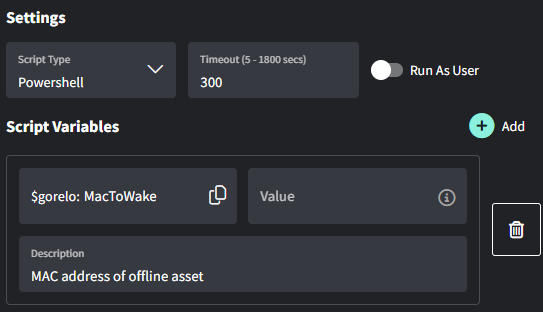
Add the ‘MacToWake‘ script variable and leave the value field blank
Save the script
Pin the script via the 3-dot menu so it’s available via the CLI
Write MAC address to a custom field script
Was this helpful?
Still need help? Share an idea