Write to a custom field (RAM Slots Used)
Written By Mikel from Gorelo
You can write to a custom asset field via scripts. This is useful for things such as BitLocker keys, rotating local admin passwords and third-party UID’s.
In this example, we'll report on RAM slots.
Step 1: Create the custom asset field
Navigate to Settings -> Assets -> Custom Fields
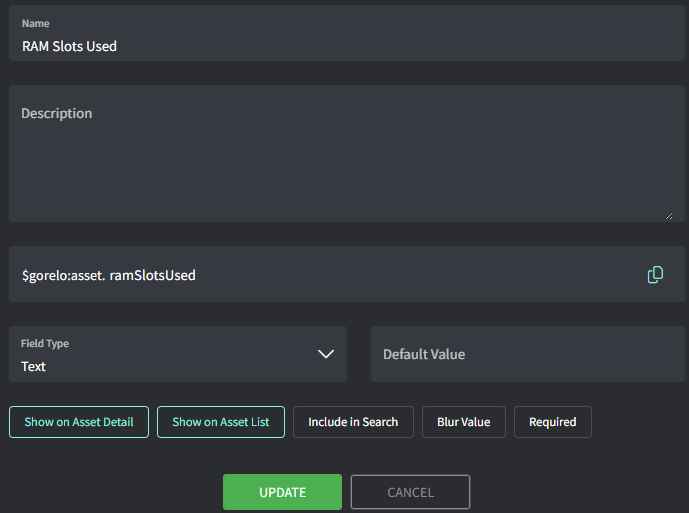
Add custom field with the following details
Name: RAM Slots Used
Variable: ramSlotsUsed
Step 2: Create the script
Navigate to Scripts
Create a script with the following details:
Name: 🗝️Store-ramSlotsUsed
Content:
$totalSlots = (Get-CimInstance -ClassName Win32_PhysicalMemoryArray).MemoryDevices
$usedSlots = (Get-CimInstance -ClassName Win32_PhysicalMemory).Count
$emptySlots = $totalSlots - $usedSlots
$totalRAM = [math]::Round((Get-CimInstance -ClassName Win32_ComputerSystem).TotalPhysicalMemory/1GB, 2)

$ramInfo = "RAM: $totalRAM GB installed | Slots: $usedSlots/$totalSlots used ($emptySlots empty)"

# Set Gorelo RMM custom field
GoreloAction -SetCustomField -Name 'asset.ramSlotsUsed' -Value $ramInfo

Write-Host "Set Gorelo field 'asset.ramSlotsUsed' to: $ramInfo"
Step 3: Deploy the script via a policy
Navigate to Policies
Edit an existing policy that covers the assets you want to report on RAM slots used
Add the '🗝️Store-ramSlotsUsed' script and set to repeat daily at your preferred time
Save and Distribute the policy
Was this helpful?
Still need help? Share an idea