Release Notes 2026-10-09
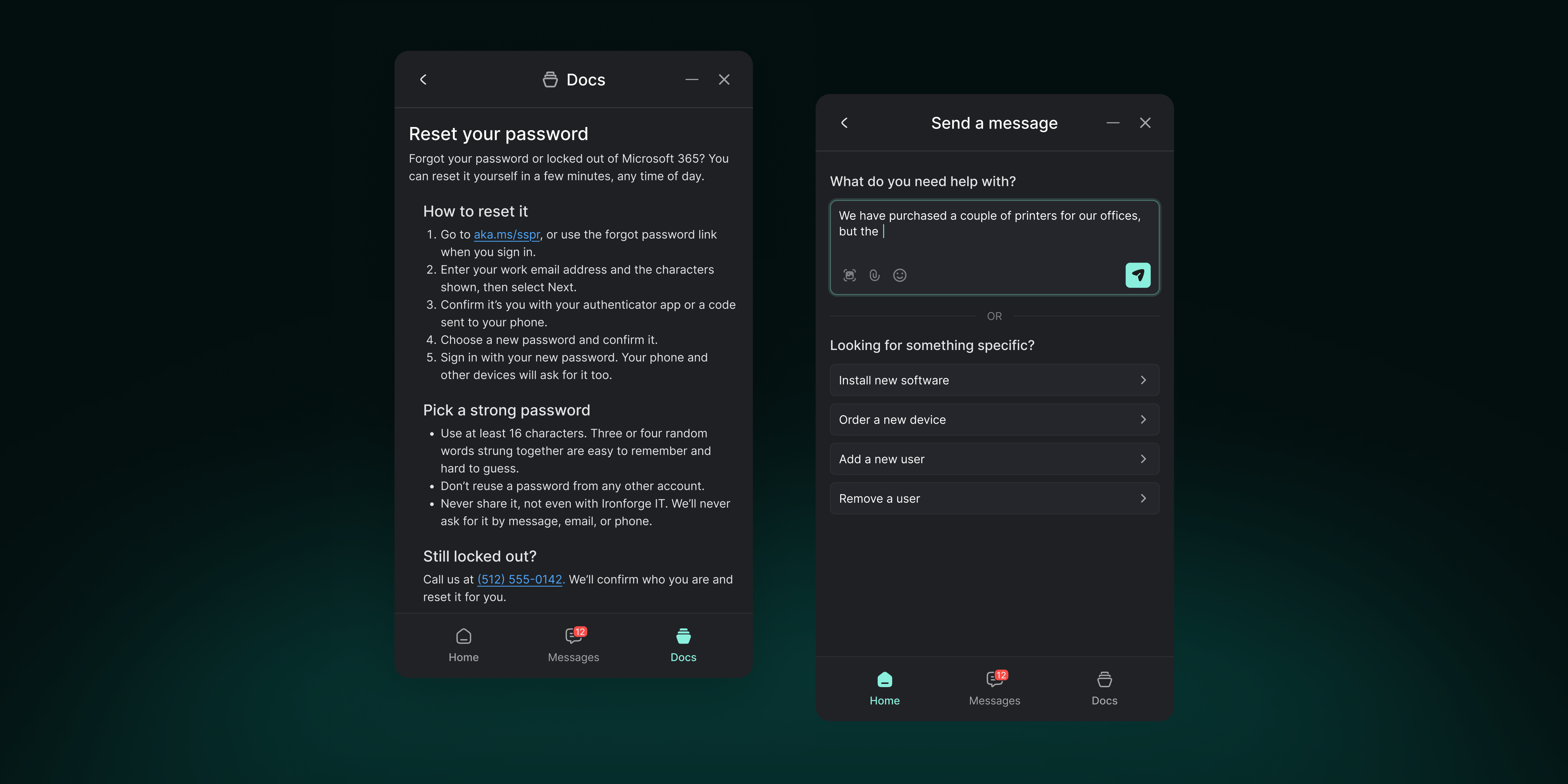
💬 Gorelo Messenger — Now with Docs and Forms
Your users can now find answers and ask for exactly what they need, right from the Messenger. The new Docs tab lets signed-in contacts search and read the docs you’ve published to the Client Portal. Your portal forms now appear under “Looking for something specific?” when sending a message, and each submission creates a ticket, just like the portal.
Add Contact Tags to a form and only contacts with one of those tags will see it, in both the Messenger and the Client Portal. That way requests like “Add a new user” only show for managers. Docs is toggled off by default (switch it on in your policy’s Messenger plugin under Content > Navigation). Forms already available in your Client Portal will show up in the Messenger automatically.
🦄 Gorelo Connect - Remote sessions on Windows and macOS now connect directly to the device whenever possible (P2P), for lower latency and snappier control. When a direct path isn’t available, sessions run through Gorelo’s servers as before (Note: end users on macOS 15 or later will see a one-time Local Network prompt)
🦄 Gorelo Connect - You can now block the end user’s keyboard and mouse while you work, with the new Block user input switch in the session’s Privacy & input menu on Windows and macOS. Input is released automatically if the session ends or drops
📱 Mobile - Asset Detail now lets you view and edit properties, including hardware type, OS, manufacturer, serial number, warranty dates, tags and custom fields. Long press on any property to copy its value
📱 Mobile - Remote sessions now switch to landscape when you rotate your phone, and double-tap and hold now drags just like a long press
📱 Mobile - File sessions now has an Up button, a This PC view of the device’s drives and renaming for files and folders
📱 Mobile - You can now customize the nav bar and menu by dragging modules between them or hiding the ones you don’t use, and your layout is saved to your profile
📱 Mobile - Search now has its own button next to the nav bar, and asset results show the logged-on user
✨ Approve & Invoice - The amount column now shows exactly what happens to each entry when it moves to the invoice: its amount, Included, No charge, or Hidden for Non-billable entries that are recorded on the invoice but not shown to the client
✨ Forms - Contacts can now see the form they submitted in the ticket timeline, in both the Client Portal and the Messenger
✨ Gorelo Connect - You can now copy files on your computer and press Ctrl+V (⌘V on Mac) in a session to paste them straight onto the remote device, up to 500 MB per file
✨ Gorelo Connect - Images copied on the remote device now land on your local clipboard, ready to paste, when Sync clipboard is on
✨ Gorelo Connect - New Translate keyboard mode (⋯ > Keyboard > Translate) lets you type in your own keyboard layout, including accents and IME input, while shortcuts work as before
✨ Gorelo Connect - You can now change the remote screen’s resolution mid-session from the new Resolution menu on Windows, and the original resolution comes back when the session ends
✨ API - POST /v1/payments - record a payment received outside Gorelo against an Approved invoice. Leave out Amount to pay the full balance; the invoice becomes Paid when nothing is owed. Not available while Xero or QuickBooks is connected
✨ API - DELETE /v1/payments/{paymentId} - remove a payment recorded through the API. The invoice goes back to Approved if it now owes money
✨ API - GET /v1/invoices/{invoiceId} - now lists payments on the invoice
✨ API - POST /v1/contacts - leave out ClientId to create a temporary contact for a requester who isn’t linked to a client yet. Tickets with no client accept temporary contacts as the contact and CCs
✨ API - GET /v1/contacts - now includes temporary contacts
✨ API - POST /v1/assets/custom and PATCH /v1/assets/custom/{customAssetId} - create and update custom assets. GET /v1/assets/custom/hardware-types lists the hardware types they accept
✨ API - GET, POST and DELETE /v1/api-keys - list, create and revoke API keys, so integrations can issue narrower keys for each job and rotate them without visiting settings. Creating a key needs Organization write access, and a key can only grant access it already has.
✨ API - Importing history no longer notifies anyone. Tickets, comments, projects and tasks created with a backdated CreatedOn send no emails or notifications and trigger no automations. To import a closed ticket, create it closed with ClosedOn, then add its comments
🐛 Assets - Fixed an issue where Asset Shortcuts using custom app links, such as RustDesk, didn’t open
🐛 Clients - Fixed an issue where client custom fields with Blur value turned on showed their old and new values in plain text in the client timeline
🐛 Contracts - Fixed an issue where hovering over an open contract, product or bundle tab, or viewing a contract’s timeline, showed $ instead of your selected currency
🐛 Messenger - Fixed an issue where hex color codes typed into the Messenger plugin’s Appearance settings didn’t update the color swatch or live preview
🐛 Projects - Fixed an issue where project and task due dates could show one day earlier than the date you picked
🐛 Tickets - Fixed an issue where variables in ticket shortcuts, like the contact’s name or ticket title, weren’t filled in when used from Gorelo Mobile