Release Notes 2026-11-20
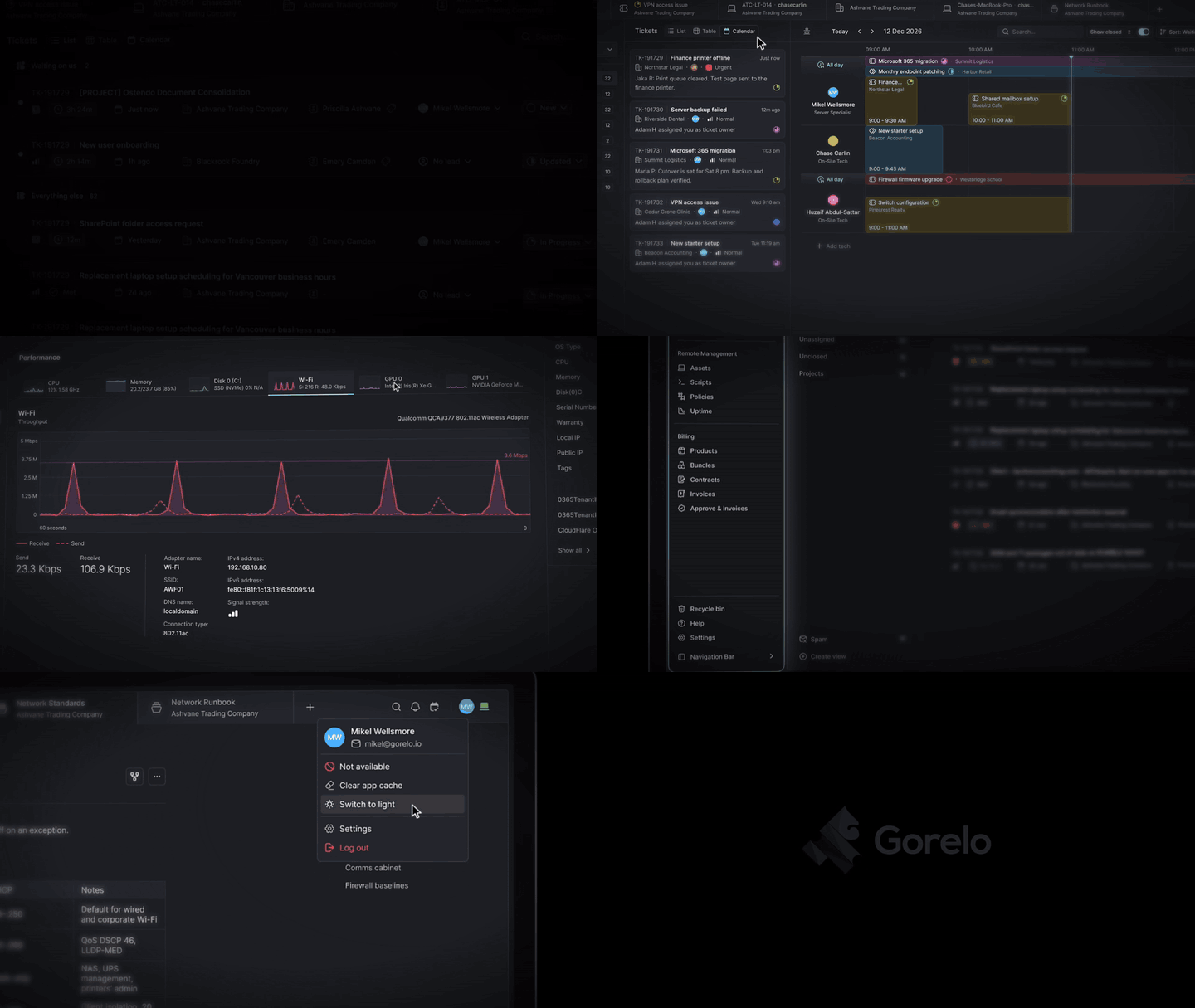
✨ The new Gorelo — Now the default experience
The redesigned Gorelo is moving out of preview. Later today, outside business hours in every region, it becomes the default at app.gorelo.io. Same account, same data, nothing to migrate. The classic UI stays available at app-classic.gorelo.io until December 11.
Last week we said there was a heap of new stuff to find. Here’s what’s worth a look:
☀️ Light mode - Gorelo now comes in light and dark. Switch any time from your profile menu.
📝 Docs - A brand new editor - Freeform docs now use a block editor. Type / for callouts, collapsible sections, code blocks with syntax highlighting and tables, then drag blocks to rearrange them. Docs autosave as you type and can be locked as read-only. Start from built-in templates (SOP, Runbook, Client onboarding, Network overview, Incident report) or your own, compare versions, and export to PDF, Markdown or HTML. Longer docs get an “On this page” outline for jumping between headings.
📅 Tickets - New calendar layout - Schedule across the whole team from one screen. Add the calendars of as many users as you need, view them vertically or horizontally, and drag and drop tickets onto anyone’s day.
📈 Assets - Performance graphs - Live CPU, memory, disk, network and GPU graphs on the asset page.
🎨 Colors, icons and emojis - Give any Type, Tag or Shortcut its own color, icon or emoji, and it shows that way throughout Gorelo.
🔎 Search on every list - Lists and tables across Gorelo now have a search box at the top.
✨ Assets - Signed bootstrap MSI for deploying through Intune, SCCM and GPO etc.
✨ Contracts - Prorated charges now only bill above what the client has already paid for the month.
✨ Editors - Paste a link over selected text to turn it into a link, click a link to edit or remove it, and use the new emoji picker.
✨ General - Clear cache and log out buttons on the loading and sign-in screens, for when a browser gets stuck.
✨ Projects - Drag and drop to rearrange sections.
✨ Reports - Filter the Ticket Summary report by status, type and tag, and the Asset Summary report by client location.
✨ Scripts - Gorelo variables now use a standard environment-variable format. $gorelo:asset.cflare becomes GORELO_ASSET_CFLARE, used as $env:GORELO_ASSET_CFLARE in PowerShell, %GORELO_ASSET_CFLARE% in Command Prompt and $GORELO_ASSET_CFLARE in Bash. Hover a variable to copy it in the format you need. Previously variables still work for backwards compatibility.
✨ Tickets - A “Show closed” switch replaces the Mine, On Hold, Pending and Closed chips.
✨ Tickets - A new Sort button sorts any ticket list on the spot without changing the view.
✨ Tickets - Pin ticket shortcuts across the top of a ticket.
✨ Tickets & Alerts - New Table layout. Switch between List and Table on alerts, and List, Table and Calendar on tickets.
✨ Timeline - Quick back-to-back changes by the same person now collapse into one line (“made 4 changes”). Click to expand.
✨ Views - Drag and drop to rearrange views in the left panel.
🐛 Assets - Fixed an issue where tags couldn’t be edited on offline devices.
🐛 Contracts - Fixed an issue where regenerating an invoice could charge prorated seats twice, and a removed prorated entry could be charged again.
🐛 Contacts - Fixed an issue where time matched to a block hours contract at approval or ticket close was charged hourly, despite showing as $0 Included.
🐛 Time Entries - Fixed an issue where time entries were saved with a billable status of “None” after the work type changed.
🐛 Reports - Fixed an issue where the Time Spent report showed the wrong start time after daylight saving changes.