Client Financial Overview Dashboard
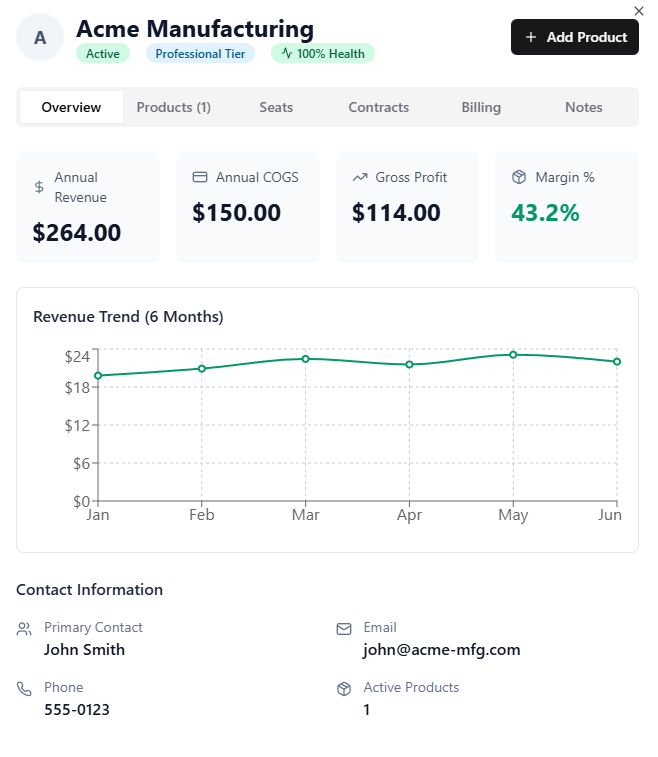
Add a “Client Financial Overview” panel on each client’s account page that surfaces key revenue/cost/profit metrics and trends at a glance, similar to the attached mockup.
Why this matters / Problem
Right now, getting a quick financial read on a client requires clicking into invoices, contracts, or reports. That’s slow and makes it hard to:
evaluate client health during QBRs
spot margin creep early
prioritize account management time
make fast decisions on pricing, renewals, and upsells
We need a one-screen snapshot that answers: “Is this client profitable, trending up/down, and why?”
Proposed Solution
1) Add an Overview → Financial Snapshot section
On the client Overview tab, display four KPI tiles:
Annual Revenue
Sum of billed/recognized revenue for trailing 12 months (or current FY toggle).
Annual COGS
Sum of direct costs tied to the client for trailing 12 months.
Include product/license costs, vendor passthroughs, and any marked “COGS” expenses.
Gross Profit
Annual Revenue – Annual COGS.
Margin %
Gross Profit / Annual Revenue.
Each tile should be clickable to drill into the underlying line items (invoices, products, expenses) that make up the number.
2) Add a Revenue Trend Chart (last 6–12 months)
A simple line chart showing monthly revenue totals for the client.
Default view: last 6 months
Toggle: 6 / 12 / 24 months
Hover tooltip: month, revenue, # invoices, largest invoice
Optional but valuable: overlay a second line for COGS or gross profit.
Data/Logic Notes
Revenue source: paid invoices OR recognized recurring billing (depending on Gorelo’s model). Ideally give a toggle: Cash basis vs Accrual basis.
COGS source: products/licenses marked as cost items + vendor invoices linked to client.
Time window: trailing 12 months by default.
Currency: follow tenant default; align rounding with reports.
Business Impact
Faster QBR prep and real-time client health reviews
Better margin control (catch loss leaders early)
Clearer justification for price increases or scope changes
Helps MSPs/recurring-revenue shops manage accounts proactively
Log in to comment and vote
No comments yet
Be the first to share your thoughts.