Overall Business Dashboard (MSP Performance & Financial Health)
Add a “Business Dashboard” page that provides an at-a-glance view of MSP performance, financial health, and upcoming risk/opportunity (renewals, AP, licensing variance). Think: executive cockpit for weekly EOS meetings + monthly financial reviews.
Problem / Why this matters
Are we growing MRR/ARR month over month?
Is gross margin healthy and trending the right way?
What does COGS look like and what’s driving it?
What renewals are coming up and what revenue is at risk?
Are we over/under-licensed anywhere?
What cash pressure is coming from AP in the next 30–90 days?
A single dashboard improves decision speed and margin control, and reduces off-platform reporting.
Proposed Solution (Core Components)
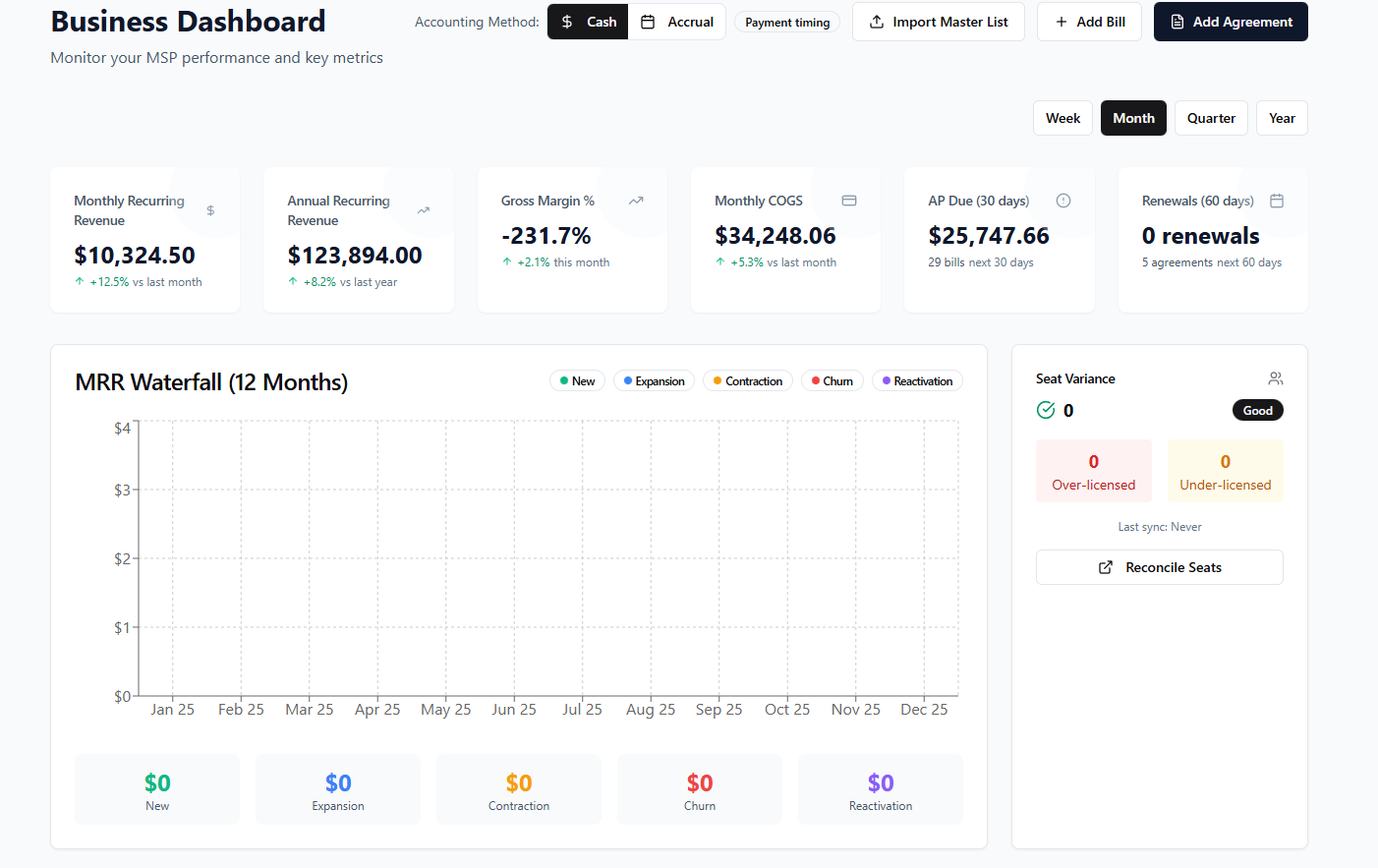
1) Dashboard Header + Controls
At top of page:
Accounting Method Toggle:
Cash / AccrualPayment Timing Toggle (if applicable to Gorelo’s model): e.g., invoiced vs collected basis
Time Window Selector:
Week / Month / Quarter / YearPrimary Actions:
Import Master List
Add Bill
Add Agreement
These filters should update all widgets consistently.
2) KPI Tiles Row (Executive Summary)
Display 5–7 top metrics as tiles, each with % trend and drilldown.
Recommended tiles (based on mockup):
Monthly Recurring Revenue (MRR)
Current period MRR, delta vs last period.
Annual Recurring Revenue (ARR)
Current ARR, delta vs last year.
Gross Margin %
Based on selected accounting method/time window.
Monthly COGS
Total direct costs this month, delta vs last month.
AP Due (next 30 days)
Total payables due + count of bills.
Renewals Due (next 60 days)
Count of agreements renewing + optional $ value at risk.
Optional extra tile:
7. New Business / Expansion MRR this period
Useful for sales/ops visibility.
Each tile opens a relevant detail view.
3) MRR Waterfall (12 Months)
A waterfall or stacked bar view showing MRR movement by category:
New
Expansion
Contraction
Churn
Reactivation
Include totals per category in small tiles below the chart (like your mockup). This makes net retention obvious.
4) Seat / License Variance Widget
Right-side widget:
Status summary:
Over-licensed count,Under-licensed count“Good / Warning / Critical” indicator
Button: Reconcile Seats (link to seat reconciliation flow)
This directly impacts margin — it should be prominent.
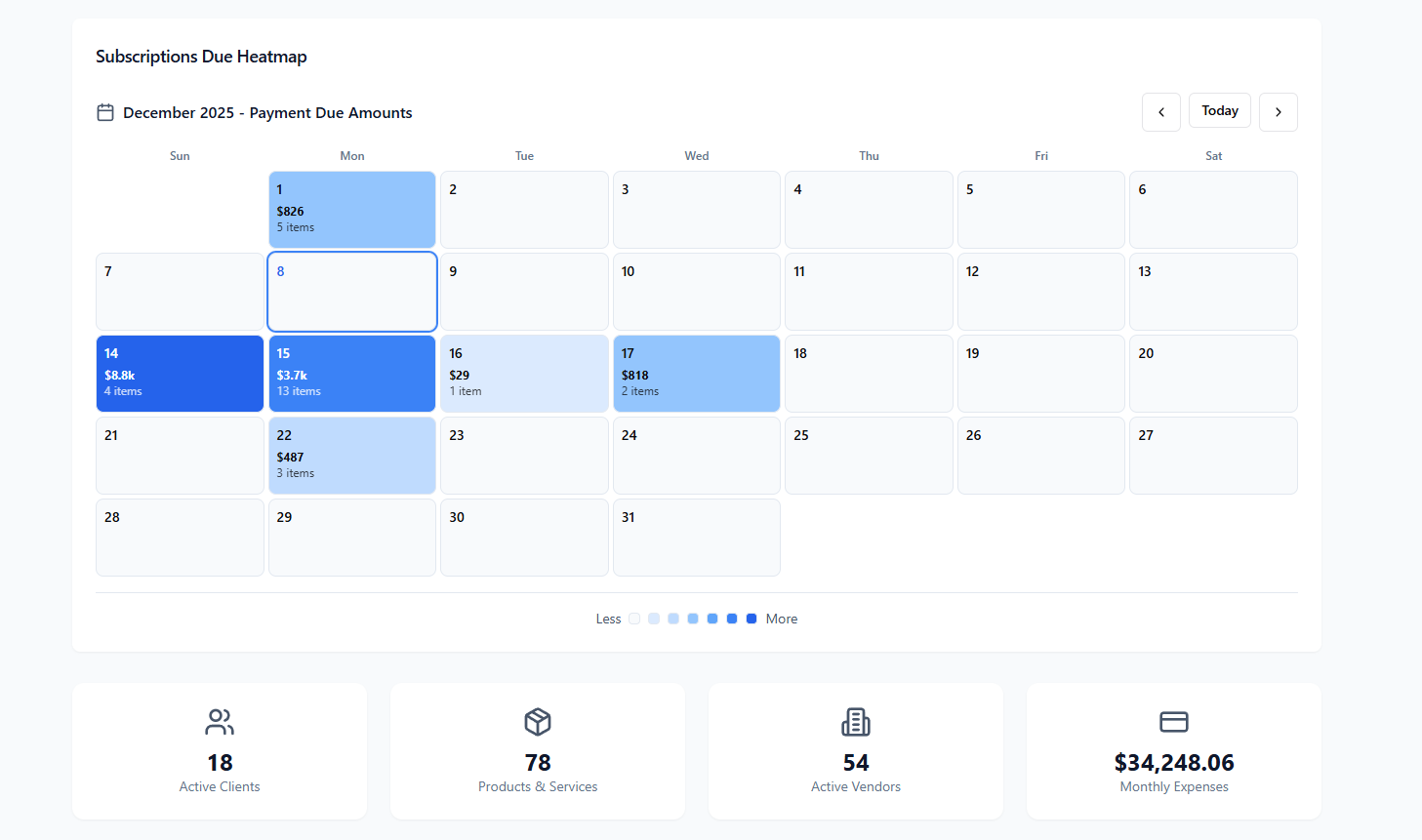
5) Subscriptions Due Heatmap (Calendar View)
Monthly calendar heatmap showing due amounts:
Each day cell shows
$ total due+# itemsColor intensity scaled by size of due amount
Navigation arrows for month switching
Clicking a day opens list of due subscriptions/invoices
This helps forecast cashflow and prevents missed billing events.
6) Bottom KPI Tiles (Operational Scale)
Small stat tiles showing business footprint:
Active Clients
Products & Services Count
Active Vendors
Monthly Expenses (matches Monthly COGS if all costs are COGS, otherwise total opex)
These are simple but give context to growth and complexity.
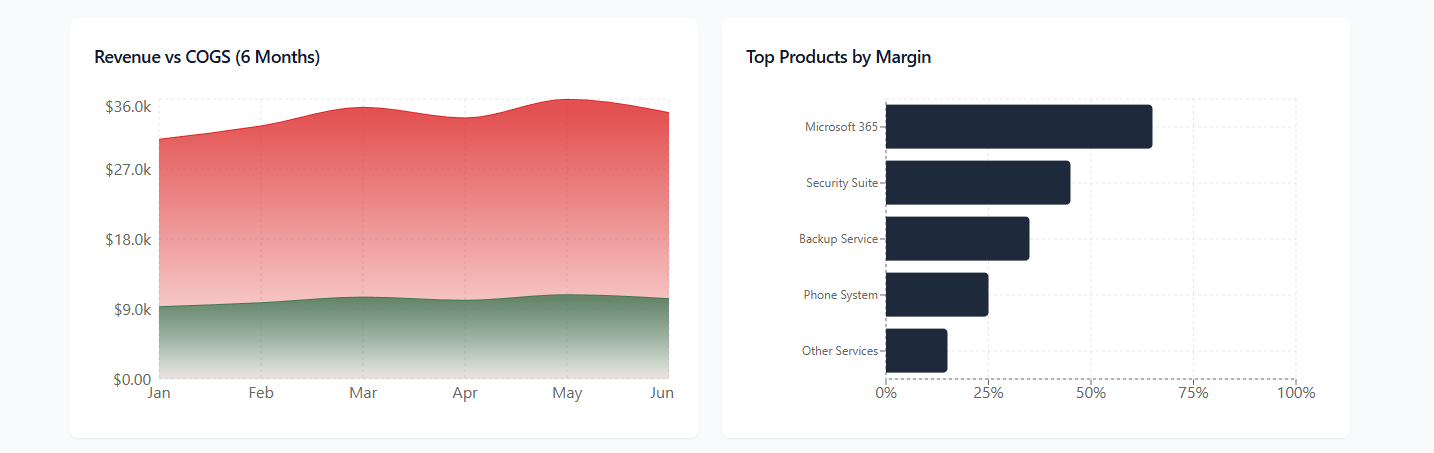
7) Revenue vs COGS Trend (Last 6 Months)
A clean 2-series area/line chart:
Revenue
COGS
Optional overlay: Gross Profit
This makes margin compression easy to spot visually.
8) Top Products by Margin
Horizontal bar chart:
Top 5–10 products/services ranked by gross margin %
Shows which offerings are actually making money.
Clicking a bar shows product margin detail and linked clients.
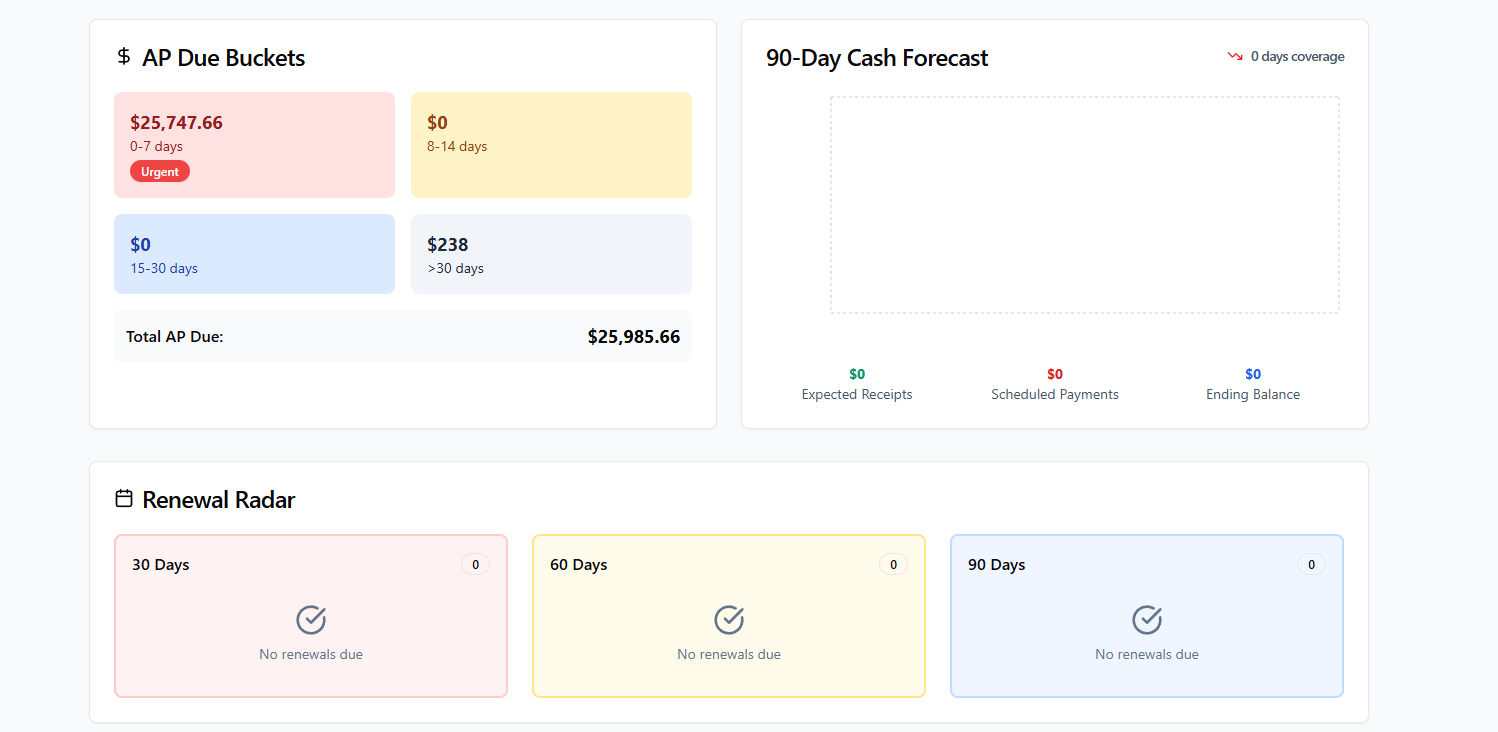
9) AP Due Buckets
Aging buckets for AP:
0–7 days(Urgent highlight)8–14 days15–30 days>30 daysTotal AP Due at bottom
Clicking a bucket opens the bills list filtered to that bucket.
10) 90-Day Cash Forecast (optional but high value)
Forecast panel showing:
Expected receipts
Scheduled payments
Ending balance projection
“Days of coverage” indicator
If Gorelo doesn’t do forecasting yet, this can be phase 2.
11) Renewal Radar
3 tiles for renewal windows:
30 days
60 days
90 days
Each shows count + optional $ value or MRR at risk. Clicking opens renewal list.
Data/Logic Notes
MRR/ARR sourced from active agreements/products with recurring cadence.
Revenue basis depends on Cash/Accrual toggle:
Cash: collected invoices
Accrual: issued/recognized invoices
COGS from products marked cost + vendor bills linked to products/clients.
Gross Margin % = (Revenue – COGS) / Revenue
Renewals from agreement end dates + notice windows.
Seat variance from PSA/RMM/license sync or manual seat counts.
All widgets respect global time filters.
Business Impact
Replaces custom spreadsheet dashboarding for MSP owners
Improves margin control and pricing discipline
Helps prevent missed renewals and billing leakage
Makes EOS weekly scorecards effortless
Increases platform stickiness (leadership lives in Gorelo)
Log in to comment and vote
No comments yet
Be the first to share your thoughts.