🦄 Messenger
Let's replace the outdated system tray icon with a modern, fully branded conversational interface directly on the client's desktop. This messenger will allow end-users to submit tickets, track existing requests, and access self-service forms or even scripts.
Log in to comment and vote
Comments36
💬 Gorelo Messenger — Your service desk on every desktop
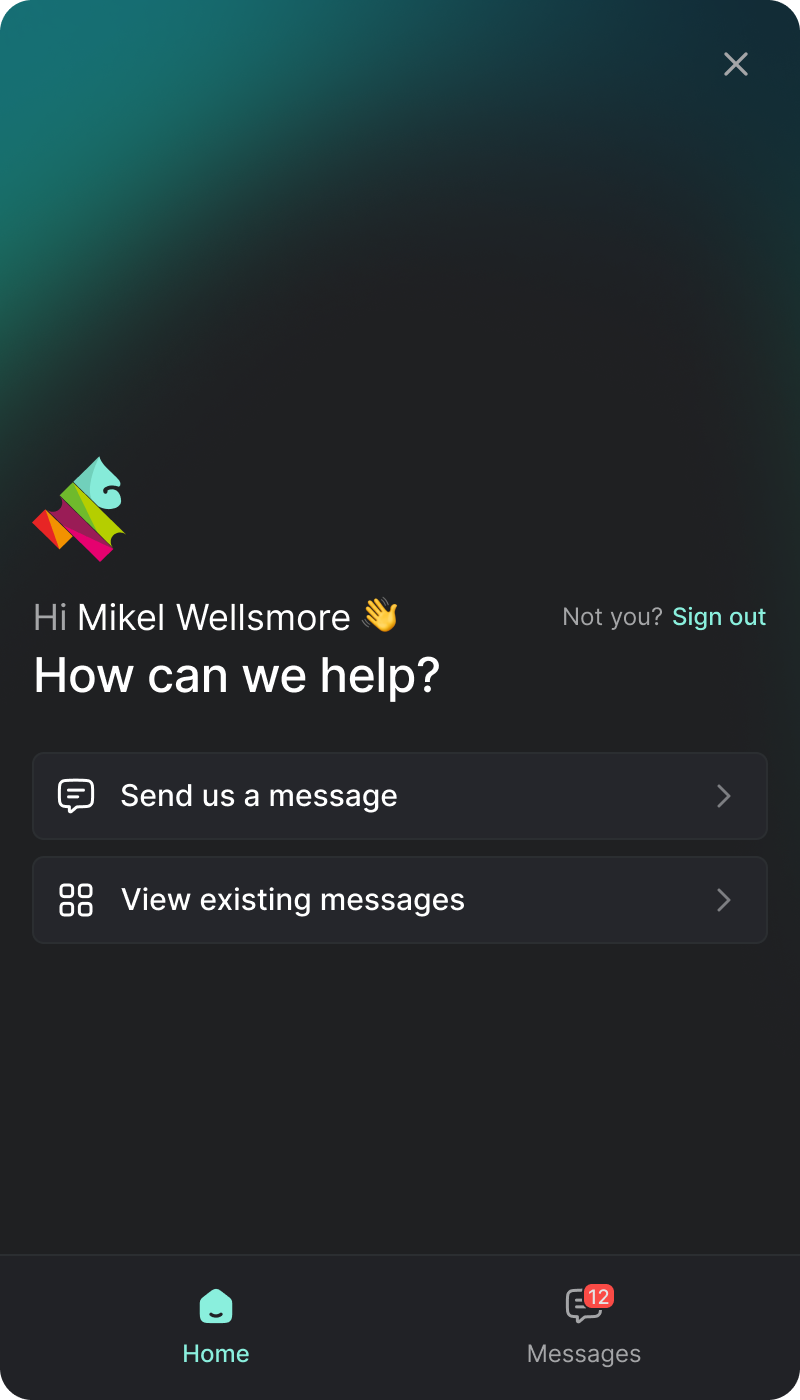
Meet the Messenger: a branded desktop app that puts your service desk one click away on the Windows and Mac devices you manage. End users open it from the system tray (menu bar on Mac), send you a message, and it lands in Gorelo as a ticket. Replies flow back into the same conversation — no portal to find, no email thread to dig through, no passwords.
This first release covers the essentials. Users sign in with their email and a one-time code (or message as a guest), see every conversation they're part of — approvals and side conversations included — and get native notifications that open the right conversation. Replies land in the Messenger first and fall back to email if the user isn't signed in or doesn't see them within a few minutes, so nothing gets missed.
It's your brand, not ours. Tray icon, hover text, logo, brand color, and home-screen background are all set centrally in Gorelo and pushed to every device.
The Messenger ships as a plugin: add it to a policy and the Gorelo agent takes care of the rest. Lots more to come here so stay tuned :)
Ivory Gust
That’s great to see!
Add user screenshots and we’ll have the makings for good support experience.
(Then customizable links & client-runnable scripts.)
Apricot Berry
this is amazing, i been waiting for this… thank you!
Apricot Berry
Hello, any update on messenger.. my clients would love this.
Gray Earth
Merged request
•110 votes
Tray - Menu
Option to include custom links from systray or form from tray to submit ticket for clients. (Or link to portal)
Violet Highlighter
Example
Copper Pickle
It would also be nice to add scrips here that end users could easily trigger.
Mikel from Gorelo
Sneak peek of what we’re imagining for v1… your own branding via colours/logo/text etc. Guest mode will also be supported for simple ticket submission.
Custom cards for scripts/links and additional modules like Docs/Announcements to come later.
Chocolate Pickle
This looks and is going to be great. I am assuming the looking for something specific area will launch other aspects, for example forms. If I have a company that I only allow one person to add a new user or send us an off boarding forms we need the ability to lockdown the forms to specific role types.
Mikel from Gorelo
Correct — they will be forms on a global, per client and per contact basis :)
Chocolate Pickle
That is great.
Amaranth Cherry
This is looking great Mikel & Team! Definitely one of the best designed “tray menus” I’ve seen compared to other RMMs. Looking forward to the custom cards and announcements as well when they drop in a future update. 🔥
Scarlet Highlighter
Looks very good Mikel !
Salmon Yogurt
Theoretically couldn’t you have the ticket portal as a third tab where this could actually replace the need for a full browser portal? or perhaps the third button would expand the window to a full portal? Might be kindof neat to have this as an all-in one deployable thing where the portal right now ive just been deploying a custom icon web shortcut.
As far as “clean looks” go this is superb, and I love the idea of being able to brand it.
Mikel from Gorelo
There are things that aren’t suited to a messenger like this and we will link out to the full portal (and carry auth across) E.g Ticket/Asset reports, invoices, projects etc.
We want to keep the messenger focused on the 95% of staff that just need the basics like tickets, docs, news :)
Salmon Yogurt
oh so this could handle tickets/docs too?
Mikel from Gorelo
Yeah — docs will come bit later though.
Salmon Yogurt
Thats awesome!
Mikel from Gorelo
We’re calling them Messages as it’s a bit more friendly and leaves room for us to include Project Tasks in the future :)
Salmon Yogurt
Yea eager to see on the release. I’m curious on how that will interact with the tickets, and see how the flow works for users looking for one particular ticket vs one message thread, or if the messages for that one ticket should be all grouped, vs separate.
Chat style ticketing was actually a big selling point for another product “deskday” which I really thought was a cool idea but wasnt fleshed out well. Giving users the freedom to “chat” while also creating cohesive ticketing is tough im sure.
Looking forward to the release. thanks for your continued development.
Teal Muffin
Looks like you’re matching or embedding Intercom? That’s cool! But it’s also more of a chat feature than a typical RMM tray menu.
@Mikel from Gorelo: As others have mentioned, it’s pretty standard/critical for an RMM tray menu to do user screenshots, customizable links & scripts — will this get them?
(The absence of these is currently a big snag for us).
Teal Muffin
BTW, it’d be good to optionally be able to attach those user screenshots to the asset itself. Of course, assets would first need attachments for that.
Mikel from Gorelo
Yes to all
Apricot Berry
This is going to be good, cant wait…
Apricot Berry
@Mikel from Gorelo any ETA on this feature? thanks
Mikel from Gorelo
Should start beta testing in the very near future.