Expirations
Generate alerts based on expiration dates throughout Gorelo
Written By Mikel from Gorelo
You can create expiration rules to alert when certain things are expiring: domains, warranty, and contracts.
Create expiration rule
Navigate to Settings —> Automation —> Expirations
Click ‘+Add Expiration’ in the top-right
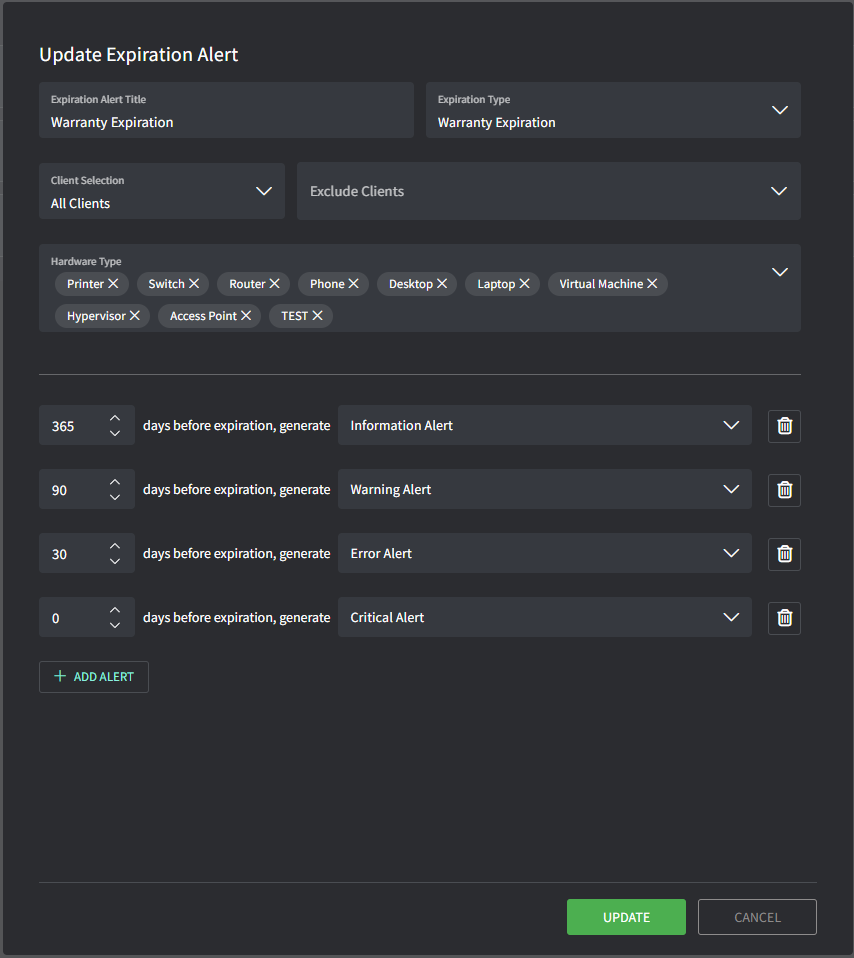
Enter details to configure the expiration rule:
Title: this will be the name of the rule (does not appear in the alert)
Expiration Type: this determines what date field the rule applies to such as
domains, warranty, and contracts.
Client Selection: this allows you to include/exclude which clients the rule will apply to
Hardware Type: this is only for the Warranty Expiration type and allows you filter by specific hardware types
Add Alert: this allows you to add multiple thresholds for generating an alert based on days remaining
Tips!
Alerts will trigger based on the organization Time Zone
(Settings → General → Organization → Business Hours)12:00 AM – Asset Warranty
1:00 AM – Domain Expiration
2:00 AM – Contract Expiration
Was this helpful?
Still need help? Share an idea