Install software using a custom client field (Bitdefender)
SentinelOne, Cove, DNSFilter etc.
Written By Mikel from Gorelo
Custom client fields can be used in scripts to install software with client specific info (keys, tokens etc.).
In this example, we'll use Bitdefender.
Step 1: Create the client custom field
Navigate to Settings -> CRM-> Custom Fields
Add custom field with the following details
Name: Bitdefender URL
Variable: bitdefenderURL
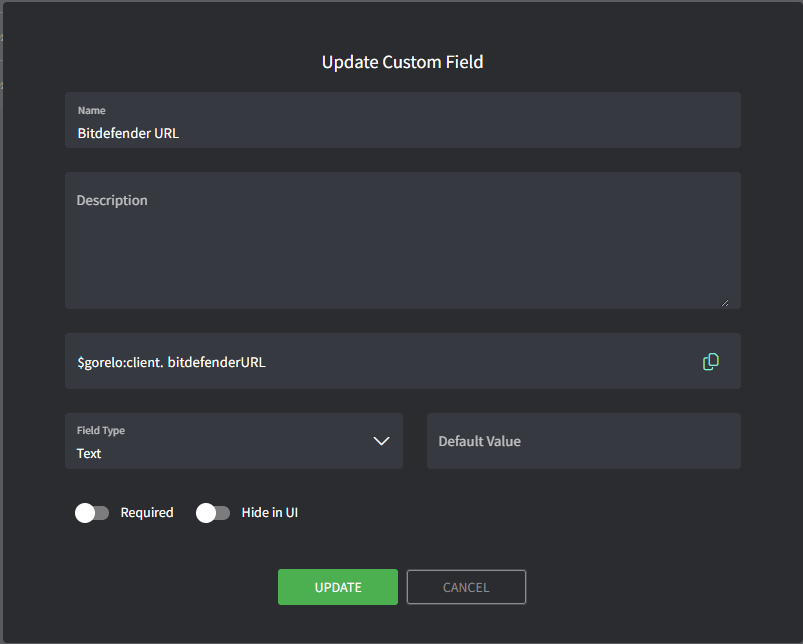
Step 2: Populate the 'Bitdefender URL' for each client
Navigate to a specific Client
Click on Custom Fields

Edit 'Bitdefender URL'
Enter the install exe URL retrieved from Bitdefender for each client
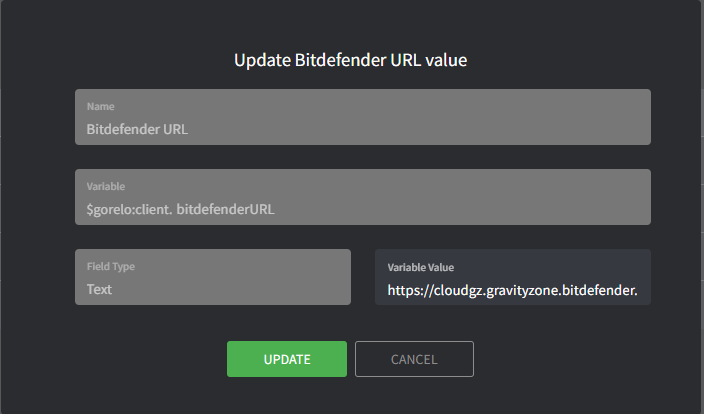
Bitdefender URL for the install exe should look like this (fake example):
https://cloudgz.gravityzone.bitdefender.com/Packages/BSTWIN/0/setupdownloader_[aHR0cHM6Ly9jbG91ZGdLWDawWVjcy5ncR5em9uZS5iaXRkZWZl3ddwawGfawdmRlci5jb20vUGFja2FnZXMvQlNUV0lOLzAvdkluc3RhbGxlci54bw-bGFuZz1lbi1VUw==].exeStep 3: Create the script
Navigate to Scripts
Create a script with the following details:
Name: ➕Install-Bitdefender
Content:
#$gorelo:client.bitdefenderURL

# Check if Bitdefender is already installed
if (Get-Service -Name "EPProtectedService" -ErrorAction SilentlyContinue) {
    Write-Host "Bitdefender is already installed. Skipping installation."
    exit 0
}

# Proceed with installation
$url = $gorelo:client.bitdefenderURL
$filename = Split-Path $url -Leaf
$installer = Join-Path $env:TEMP $filename

Write-Host "Downloading Bitdefender installer..."
(New-Object System.Net.WebClient).DownloadFile($url, $installer)

Write-Host "Installing Bitdefender..."
Start-Process -FilePath $installer -ArgumentList "/silent" -Wait
Remove-Item -LiteralPath $installer

# Verify installation
Start-Sleep -Seconds 10  # Give the service time to start
$service = Get-Service -Name "EPProtectedService" -ErrorAction SilentlyContinue

if ($service -and $service.Status -eq "Running") {
    Write-Host "Installation successful! EPProtectedService is running."
    exit 0
} else {
    Write-Host "Installation may have failed. EPProtectedService not found or not running."
    exit 1
}
Step 5: Deploy the script via a policy
Navigate to Policies
Edit an existing policy that covers the assets you want Bitdefender installed on
Add the '➕Install-Bitdefender' script and set to repeat daily at your preferred time
Distribute the policy
Was this helpful?
Still need help? Share an idea